The short answer
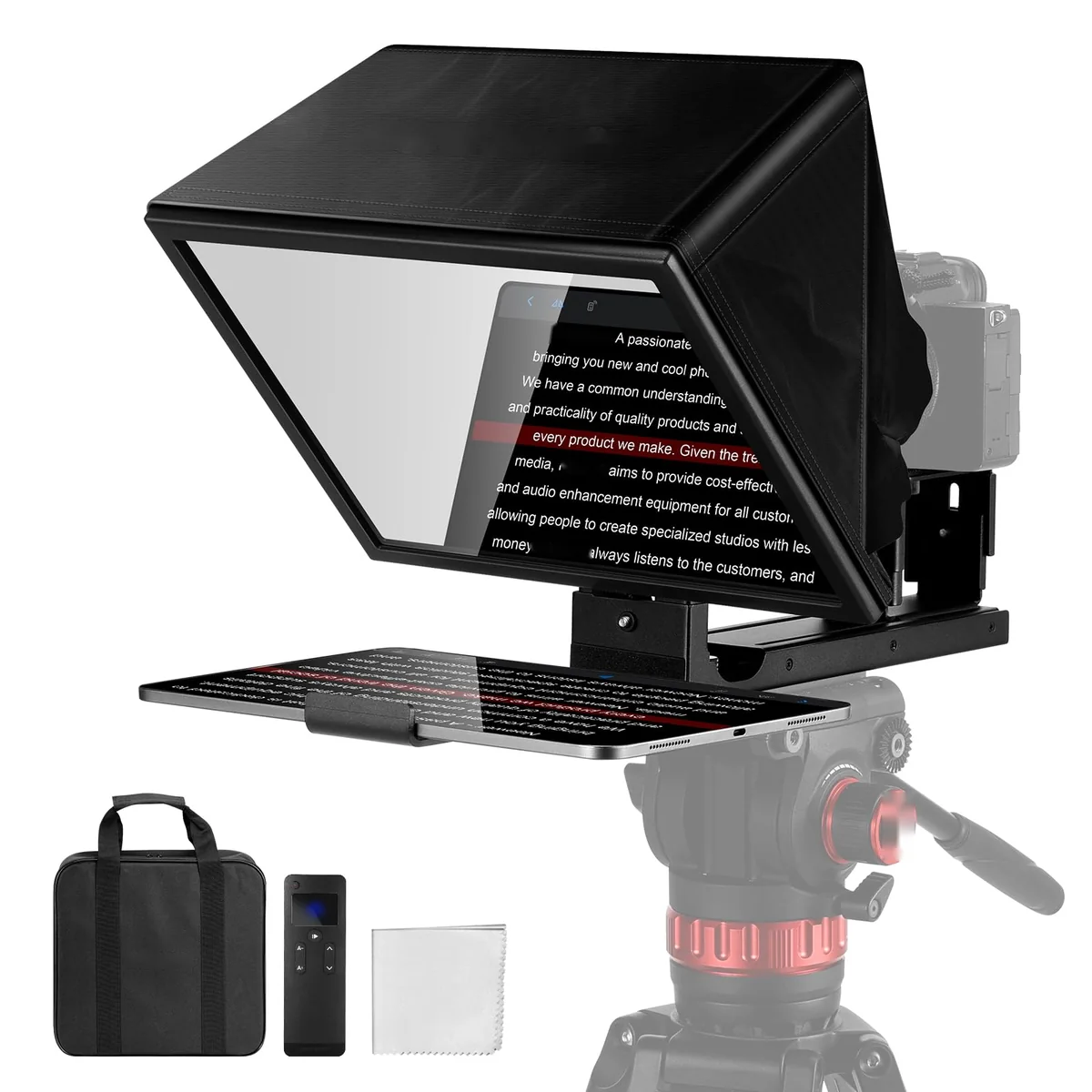
For an iPad, the NEEWER X12B is the teleprompter to look at. For an iPhone, the Ulanzi RT02. But first decide what you film with, because that decides what you need. A teleprompter has two screens in it: the one you read from and the camera that films you. An iPhone can be only one of them at a time.
Four ways to set it up
- One iPhone, no hardware. Open the EasyPrompter iPhone app and press Start camera: the lines you read sit in a narrow island under the Dynamic Island, right by the front camera. Eye contact is free and recording the take is part of Pro, but your eyes still sit slightly off the lens. See how to use your phone as a teleprompter.
- iPhone as the camera, a second phone as the prompter. The Ulanzi RT02 holds the filming iPhone behind the glass and a second phone or mini tablet under it. Eye contact, and everything in your pocket.
- A camera, an iPad as the prompter. The NEEWER X12B puts the iPad under 12-inch glass and your camera behind it. The most comfortable choice for a long script.
- A Mac and a camera or webcam. The Elgato Prompter has its own screen, which a Mac uses as a second display.
Teleprompters for iPhone
The Ulanzi RT02 is made for phones. Its holder takes a phone 55 to 80 mm wide, so most iPhones fit as the filming camera. Its prompter tray is for phones and mini tablets up to 6 inches, according to Ulanzi. The largest iPhones have screens bigger than that, so check the fit before you rely on one as the prompter.
If you only own one iPhone, the RT02 won't help much on its own: film with the iPhone and read from a second phone or a small tablet, such as an iPad mini. Otherwise the free app option above is the simplest start.
Read the Ulanzi RT02 review.
Teleprompters for iPad
The NEEWER X12B takes tablets up to 25 × 22 cm. NEEWER lists the iPad, iPad Air and 11-inch iPad Pro as compatible, and says the 12.9-inch iPad Pro is not. The glass is 12 inches, the text is readable from about 3 metres, and the X12B is for filming with a mirrorless camera or DSLR (lenses from 28 mm), not with an iPhone.
At 1,664 g it needs a sturdy tripod. Some owners find the tablet holder could grip better, so tighten it and check it before each take. Read the NEEWER X12B review.
If you work at a Mac
The Elgato Prompter has its own 9-inch screen that a Mac or Windows PC uses as a second display. Open EasyPrompter in a browser window on it. It doesn't need an iPhone or iPad at all, and works with a webcam or a camera. Read the Elgato Prompter review.
The app: iPhone, iPad and Mac
EasyPrompter has a free iPhone app, iPad app and Mac app, and works in any browser. For a glass teleprompter, turn on Mirror so the text reads the right way round in the reflection, and use a large, bold text size. With Pro, remote control lets a second device start, stop and change the speed.
Watch before you buy
NEEWER X12B Teleprompter: Mandatory For Content Creators?, Alex Larcheveque, January 2025. A tablet or phone as the prompter on the X12B.
Best Teleprompter for YouTube // Ulanzi RT02 Universal Teleprompter, ROAM it RALPH, September 2024. The RT02 with a phone in portrait and the lens limits.
The Elgato Prompter is Practically Perfect, Tom Buck, December 2023. The Prompter as a second display for a computer.
Thumbnails are stored on our site. A video loads from YouTube only when you press play.
Where to buy
Ulanzi RT02 (iPhone)
See price on Amazon
NEEWER Basics X12B (iPad)
See price on Amazon
Elgato Prompter (Mac)
See price on Amazon
Opens Amazon in your country: amazon.fr, amazon.de, amazon.pl, amazon.es and more.
As an Amazon Associate we earn from qualifying purchases.
About our reviews and guides: they bring together the makers' specifications and independent video and written reviews, checked on 20 October 2026. We haven't tested these products ourselves.
Frequently asked questions
Which teleprompter works with an iPad Pro?
The NEEWER X12B takes the 11-inch iPad Pro, an iPad Air and an iPad. NEEWER says it is not compatible with the 12.9-inch iPad Pro.
Can I film with my iPhone and read the script on it at the same time?
Not through teleprompter glass: the glass needs one screen to read and one camera to film. Use a second phone or tablet for the script, or the EasyPrompter iPhone app: Start camera puts the lines you read right under the front camera, and Pro records the take.
Do I need a special app?
You need an app that can mirror the text. EasyPrompter does it for free on iPhone, iPad, Mac and in the browser.